
| When the Access Point works in= – Fit mode, it can be switched to Fat mode through an AC (Access Controler). – Fat mode, it can be switched to Fit mode through the console port or Telnet. – Cloud mode, it can be managed through Ruijie Cloud. |


RG-WS7110, Next-Generation High-Performance 10 Gbps Wireless Access Controller
- 8 x 1GBASE-T ports, 2 x 1GE SFP/RJ45 combo ports, 2 x 10GE SFP+ ports
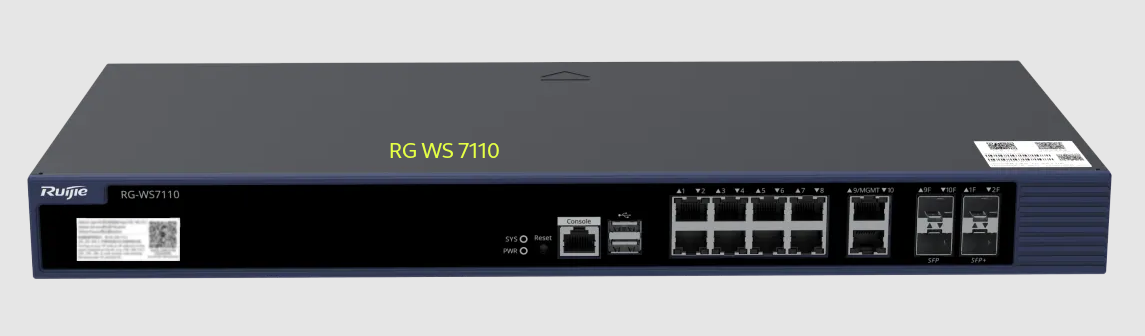
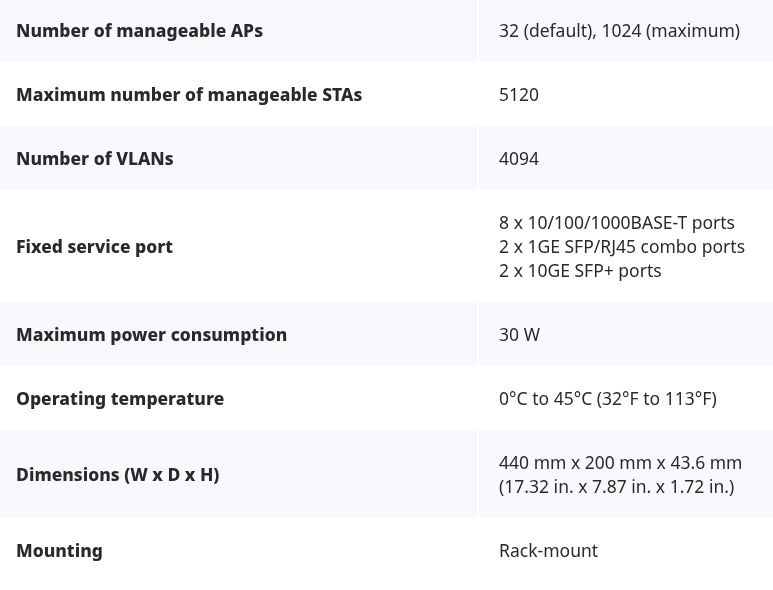
00-Ruijie RG-WS7110 Wireless Access Controller Hardware Installation and Reference Guide (V1.4)Unduh
Beberapa fitur Menarik di Access Point Controller AC Ruijie
- CAPWAP protocol (Control and Provisioning of Wireless Access Points)
- Control Tunnel : konfig, monitoring
- Data Tunnel : data traffic,
- koneksi antara AC <-> AP
- membuat tunnel
- Control Tunnel : u/ komunikasi, konfig, monitoring, pesan
- Data Tunnel : u/ kirim traffic data user
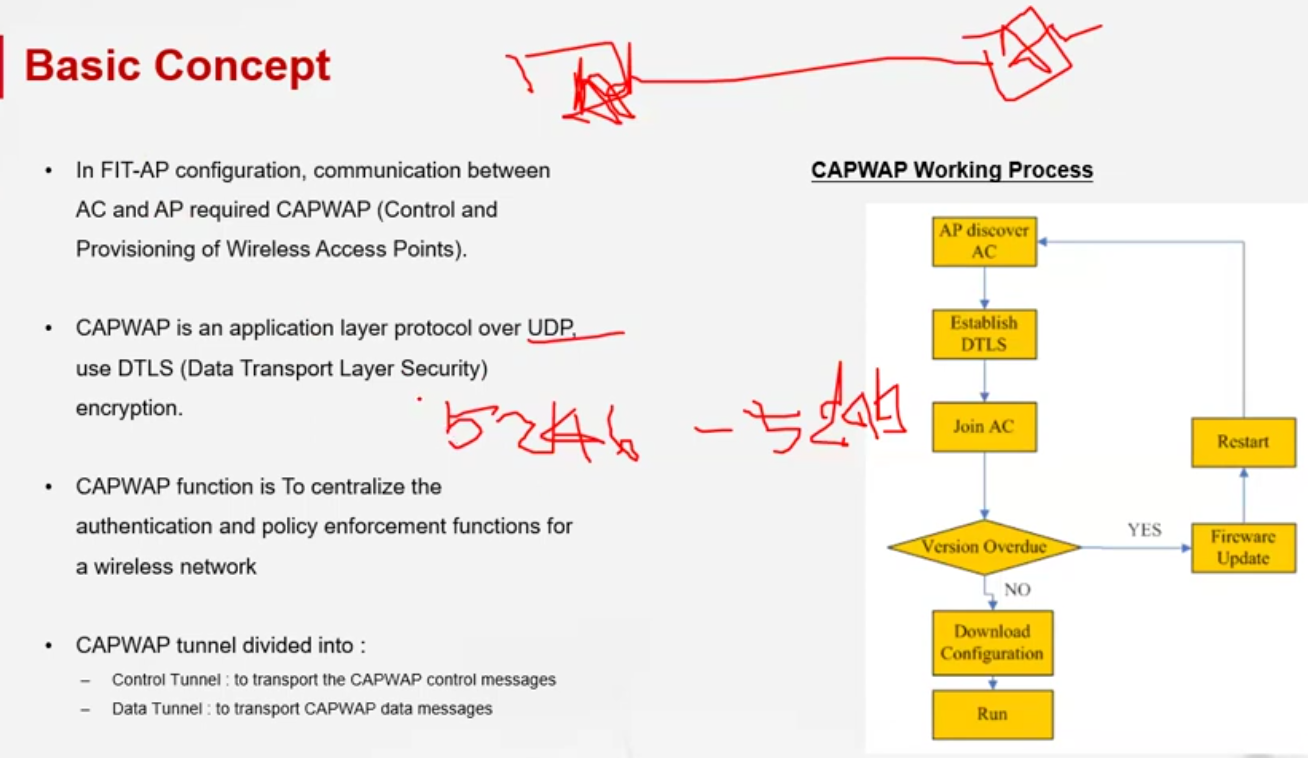
- saat AP nyala, dia akan mencari controller yg ada dalam 1 jaringan. jika ditemukan maka akan lanjut saling komunikasi
- Ruijie AP Enterprise punya 3 model management:
- FAT-AP
- MACC : cloud manage dengan ruijie cloud
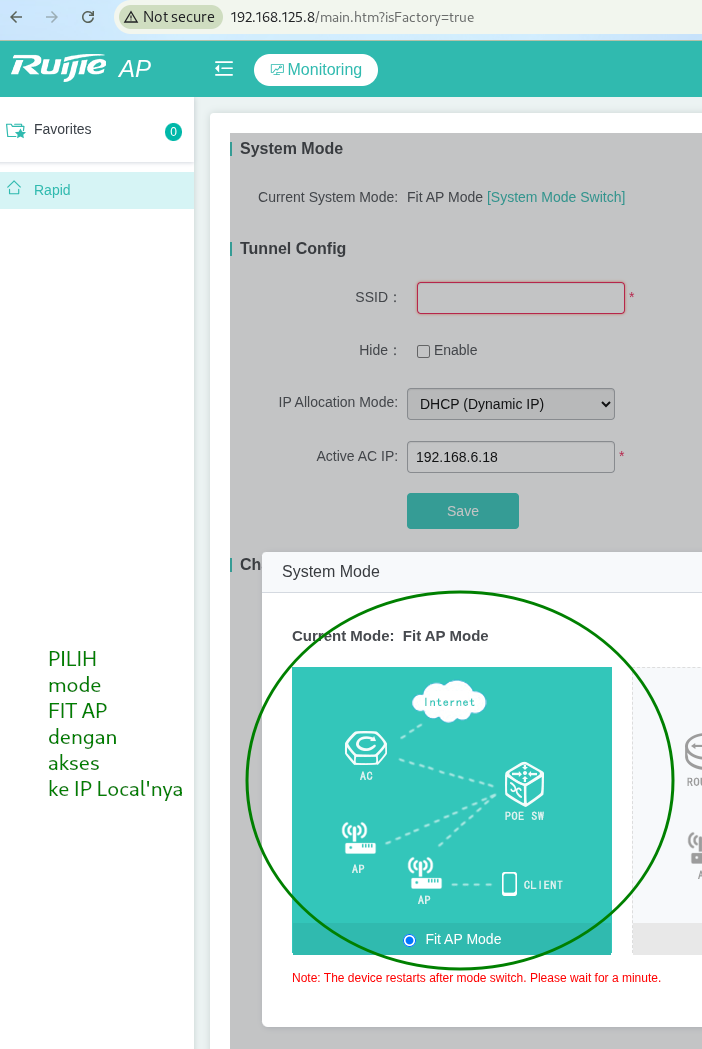
- FIT-AP (default) : mencari controller dalam jaringan (CAPWAP Discovery)
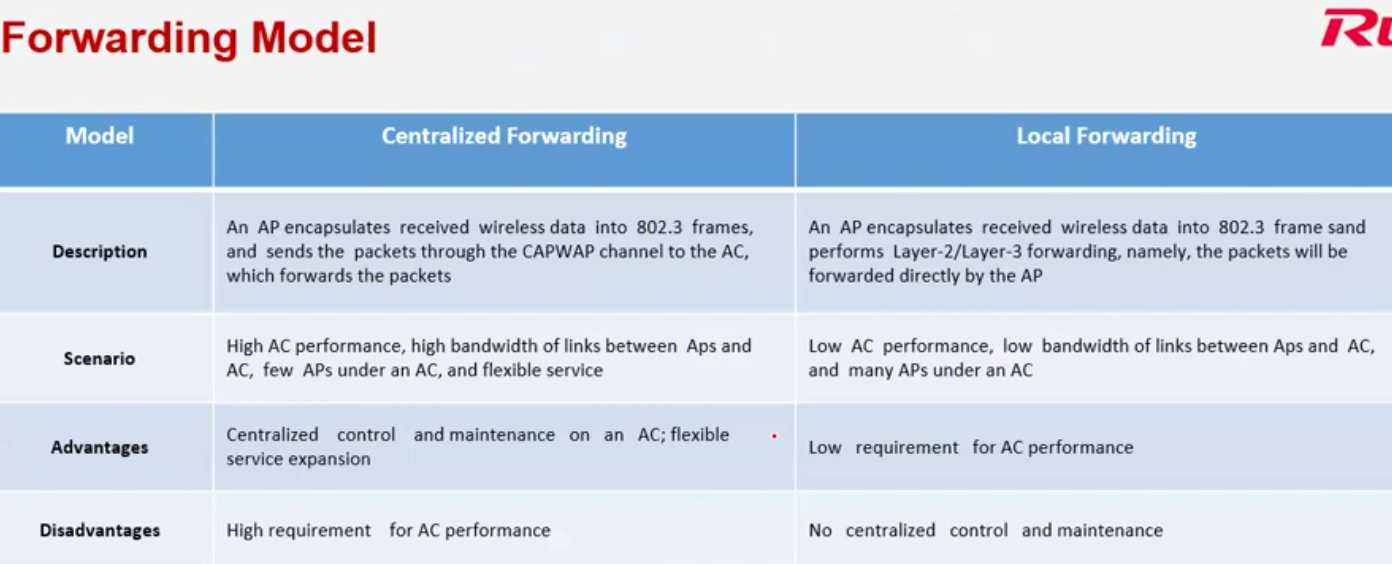
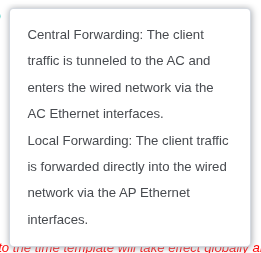
- Forwarding model
- Centralized Forwarding
contoh : kampus - Local Forwarding
contoh : kantor cabang dengan HQ,
- Centralized Forwarding
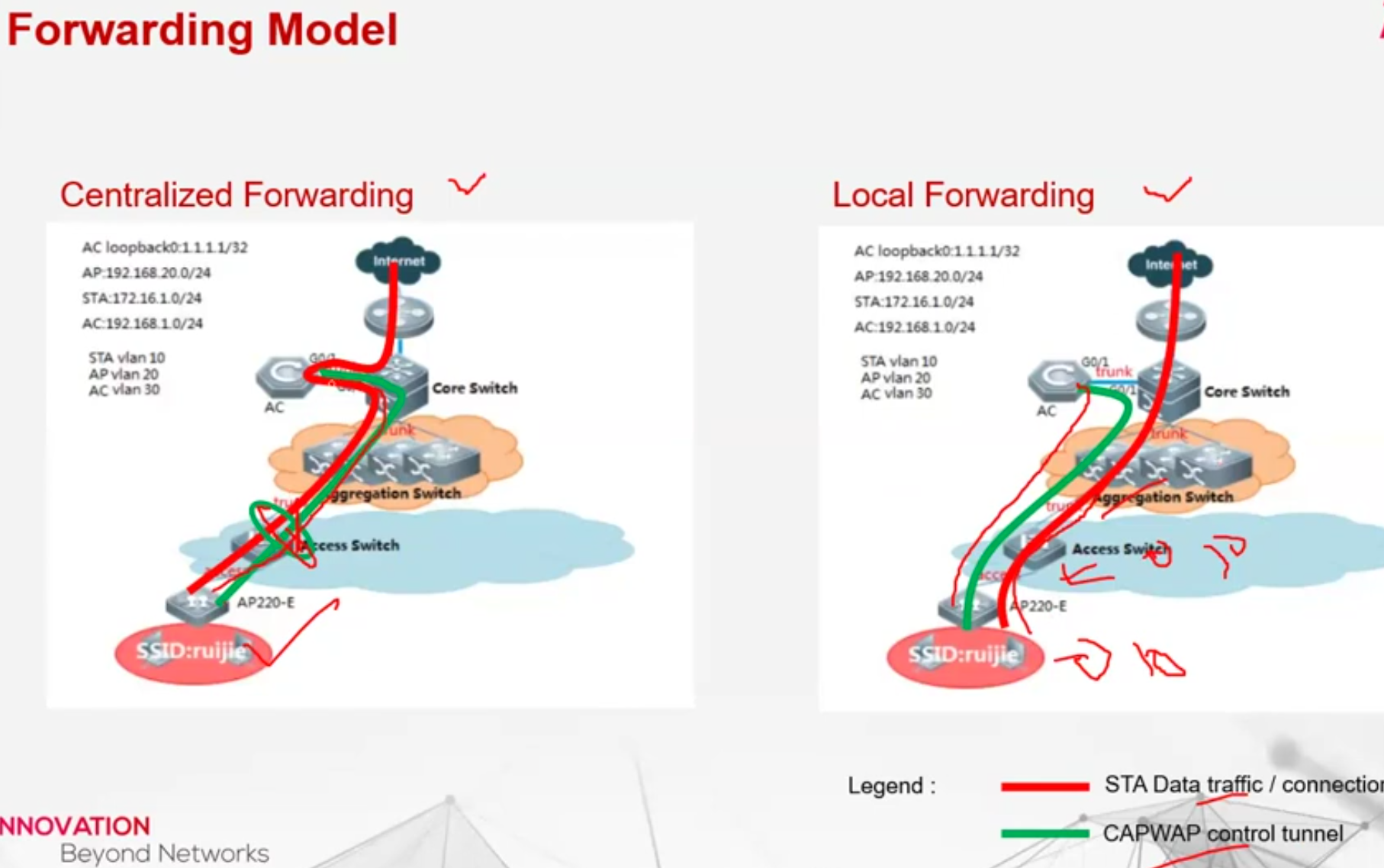
- 1 AP bisa menggunkan Central Forwarding + Local Forwarding
- Ada fitur AP Load Balance
- ada fitur security
- Work mode : access = melayani user saja
- Hybrid
- Monitor
- Blacklist
- Whitelist
- fitur Optimization (RRM)
- untuk optimasi Access Point
- RF Navigation = navigasi/ pengarahan client2 yg bisa support channel tertentu
- Mengonline’kan di ruijie cloud : masuk ke Maintenance – System – CWMP
- IP Default 10.10.10.2 / 192.168.110.1
- user / password = admin / admin
- siapkan laptop, colokan ke salah satu port LAN
- cek ping = jika berhasil langsung masuk ke browser, panggil IP tersebut
- jalankan konfig wizard
- Configure AC
- IP Address = 10.10.10.2
- subnet mask = 255.0.0.0
- default gateway = 10.10.10.1
- country = indonesia
- time zone = indonesia
- Configure AP (Access Point)
- AP is in VLAN = 1
- interface Address = 10.10.10.2
- Subnet = 255.0.0.0
- AP Address Pool on : other device
- AC Tunnel Address : 10.10.10.2
- Configure wifi
- Dual Radio = aktif
- SSID = wifi saya
- Encryption : WPA/WPA2-PSK
- password = www123451
- forwarding mode = centralized forwarding
- STA is in VLAN = 1
- interface address = 10.10.10.2
- subnet = 255.0.0.0
- STA Address Pool = other device
- masuk ruijie controller (AC)
- konfig AP (Access Point) yg akan di masukkan ke controller
- 1 pastikan AP yg akan ditambah tidak berada di cloud Ruijie (MACC)
- user default AP : admin / admin
- masuk ke konfig AP > CLI via IP Local’nya
ada di menu maintenance > System > Web CLI
ketik :- config > enter
- ap-mode fit > enter
- end > enter
- lakukan dengan cepat >> segera masuk ke Ruijie Cloud MACC nya > lalu hapus (Delete)
- masuk ruijie controller AC (lama restart AP sekitar 2menit)
- seharusnya secara otomatis AP baru akan muncul di controller AC karena sudah 1 jaringan
Inject IP Controller Wireless via CLI di AP Ruijie
Hal ini akan berbeda-beda, bergantung model :
- Sintaks umumnya seperti ini :
enable
configure terminal
ap-controller ip 192.168.6.18
end
write- 1. Mode CAPWAP (paling umum)
enable
configure terminal
capwap ac ip 192.168.6.18
end
write- Jika via static AC discovery
enable
configure terminal
ac-controller ip 192.168.6.18- Cek apakah sudah connect ke AC
show capwap client
atau
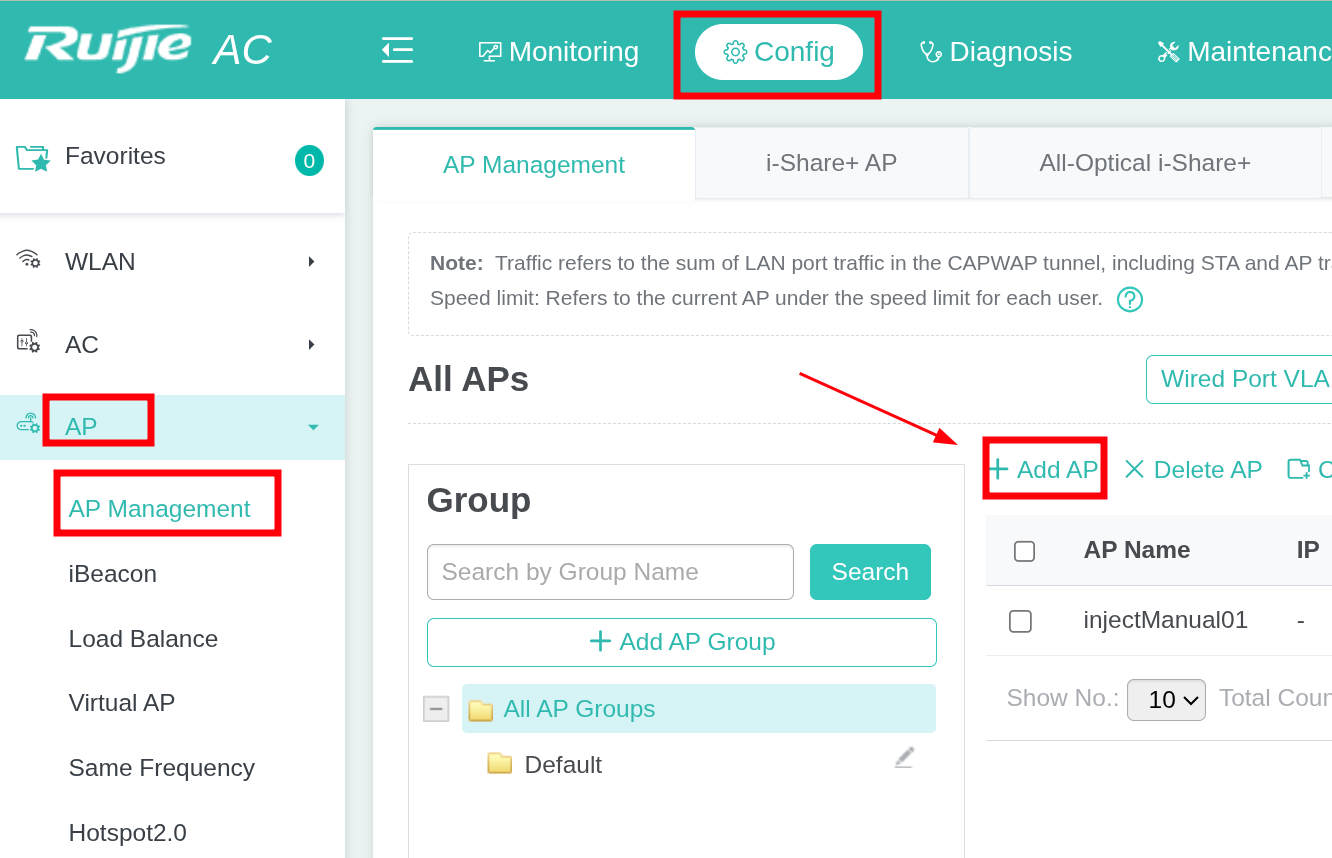
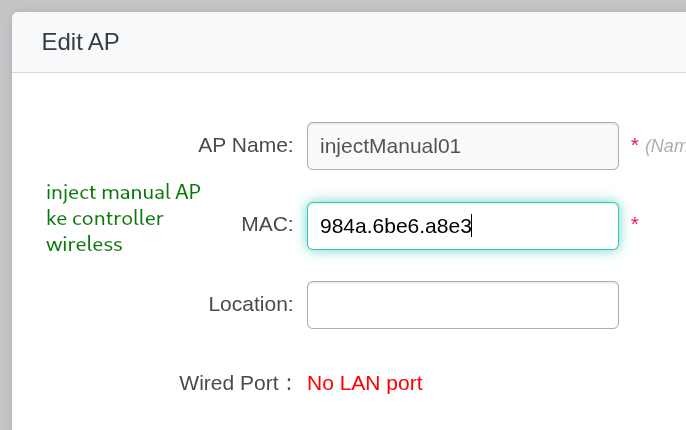
show ap-config- cara inject AP manual ke controller
- untuk MAC pakai format = aabb.ccdd.eeff
biasanya MAC ditampilkan dalam bentuk =
aa:bb:cc:dd:ee:ff
Catatan2 :
- Controller AP Ruijie CAPWAP adalah controller untuk AP Ruijie. Kategori device yg bisa manage mengguankan controller on-premise ini adalah :
- Ruijie Enterprise
- Ruijie SME (Small Medium Enterprise). contoh AP :
- AP720-L
- AP680-L
- Kategori AP Ruijie Reyee it menggunakan controller cloud (https://cloud-as.ruijienetworks.com/), contoh AP :
- RAP2200(E)
- RAP2200(F)
- RAP2260(G)
Set Bandwidth di Wifi / SSID
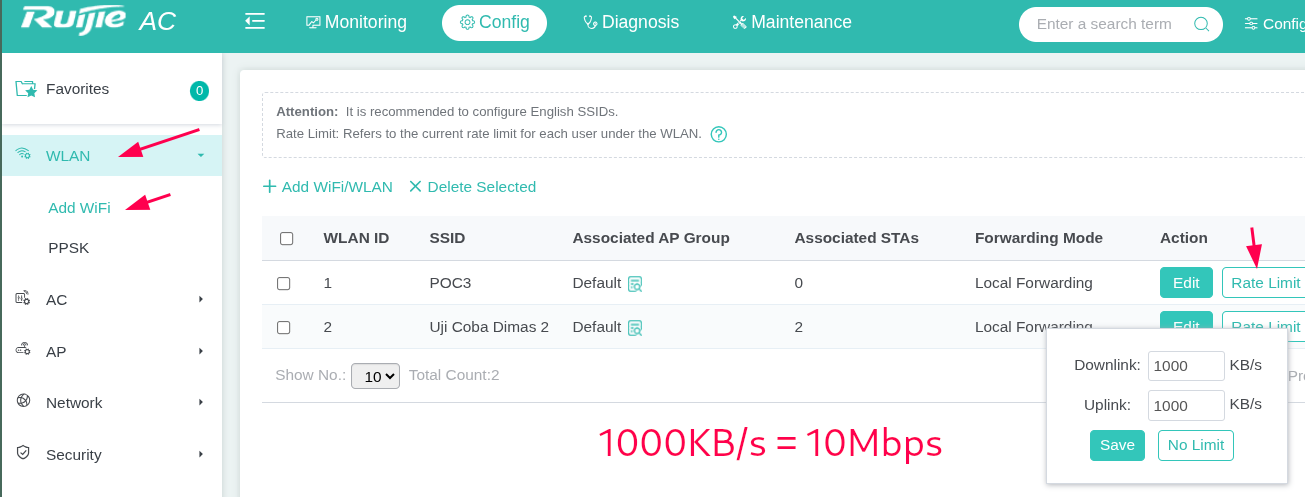
- masuk menu Config
- WLAN
- Add Wifi
- pada SSID pilih “Rate Limit”
- 1000 KB/s = 10Mbps
1. Masukkan Access Point & buat group AP
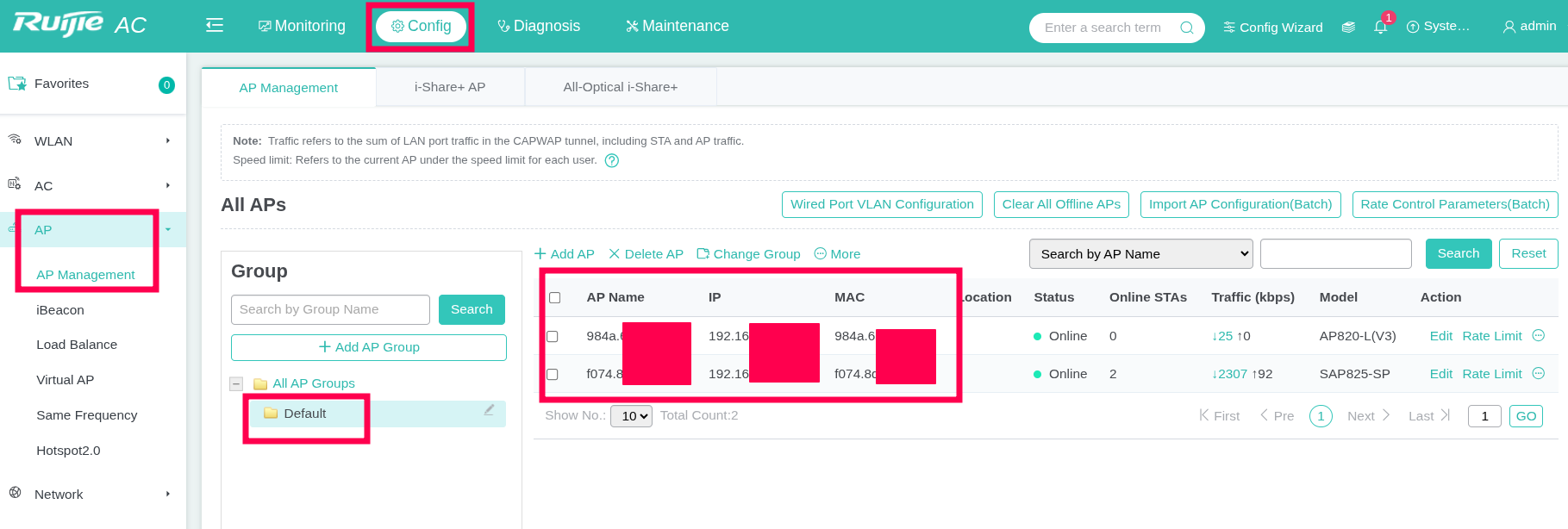
- masuk menu Config
- AP >> AP Management
- Tambahkan AP
- Buat group
- masukkan AP ke dalam group
2. Buat SSID wifi
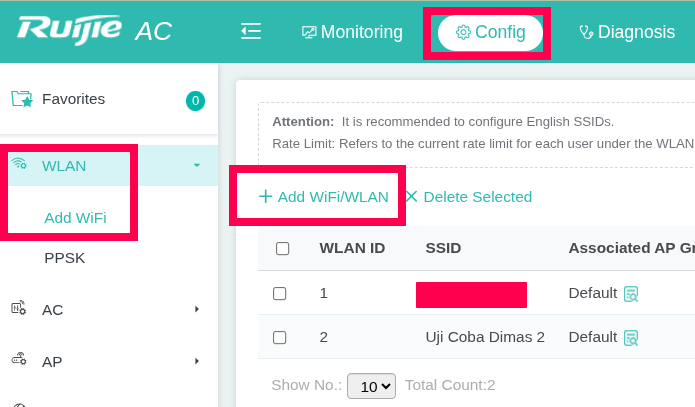
- masuk menu Config
- WLAN
- Add Wifi
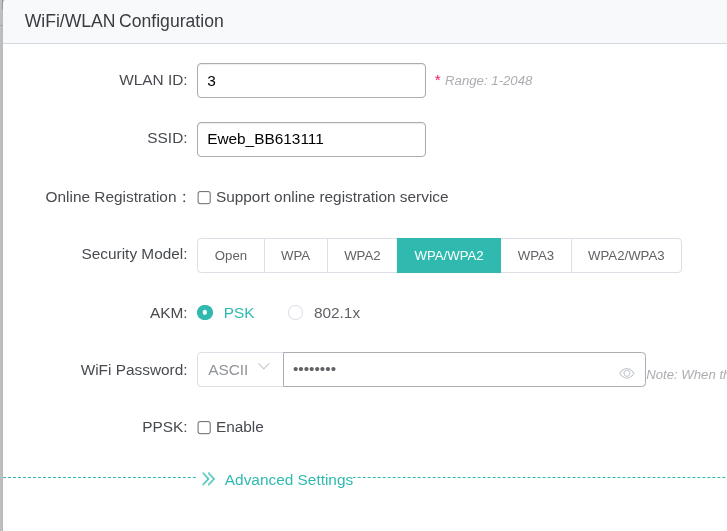
- lakukan konfig2 yg diperlukan di menu add wifi/SSID
CAPWAP port open public jika akan dikasih IP Public :
| Fungsi/Peran | Protokol | Nomor Port | |
| CAPWAP Control | UDP | 5246 | |
| CAPWAP Data | UDP | 5247 | |
| TFTP / FTP | UDP TCP | 69 21 | |
| DHCP | UDP | 67,68 | |
| Web Management | TCP | 80, 443 |
Perbedaan manage Cloud vs WAC (Wireless Controller)
yang berasa upgrade antara cloud dan wac lebih ke management STA/client.
jadi untuk roaming, limitasi jumlah client, bandwidth limit lebih akurat di wac.
Urutan yang menarik untuk dicoba : [versi chatGPT]
- Central Forwarding vs Local Forwarding
- 802.11k/v/r Fast Roaming
- RSSI Threshold
- Band Steering
- Load Balancing
- PPSK
- RF Optimization
- Rogue AP Detection
- Portal Authentication
- User Isolation
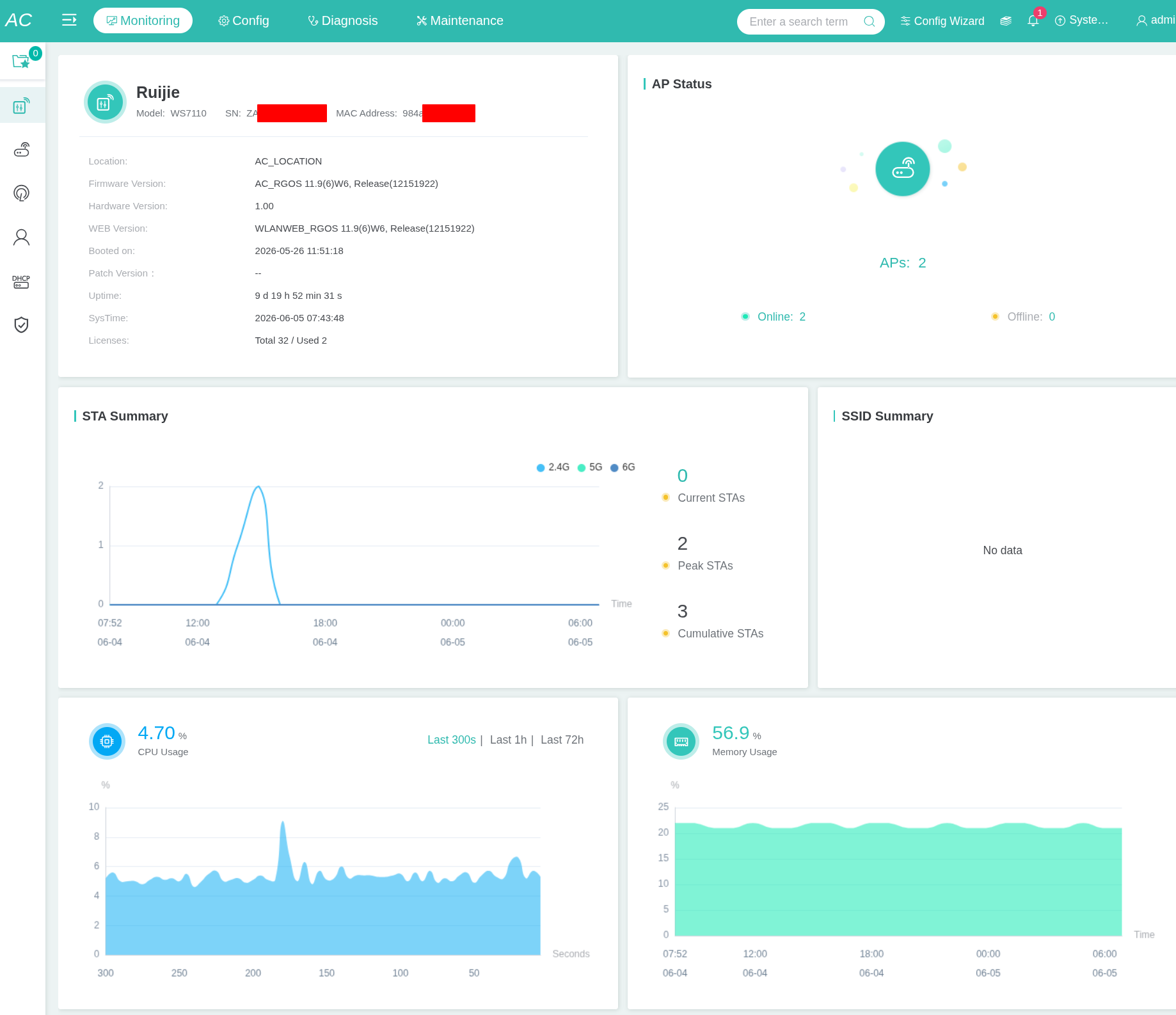
Dashboard
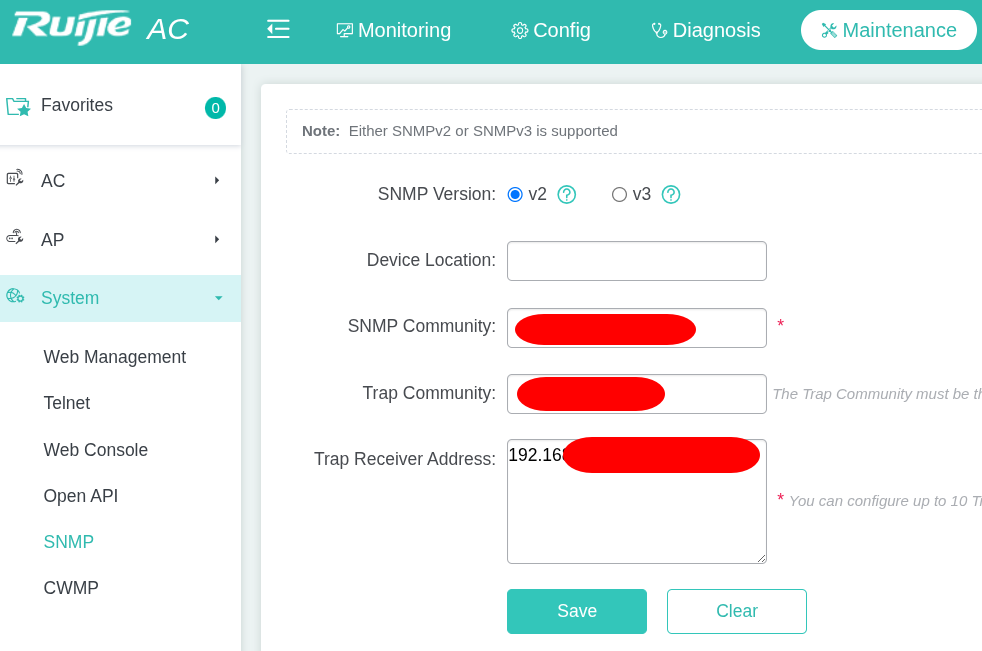
Set SNMP
- set Maintenance
- System
- SNMP
- masukkan parameter2 yg dibutuhkan
Ruijie Access Point (AP)
Contoh Access Point SME (Small Medium Enterprise)

Contoh Home Wifi / Modem Ruijie kelas SMB (Small Medium Bussiness)

Contoh AP Indoor kelas SMB (Small Medium Bussiness)


